
At COMPUTEX 2025, lots of brands started ramping up and showcasing new products that are using Thunderbolt 5. Other World Computing, commonly known as OWC, has a section at their booth dedicated just for Thunderbolt 5 products – and we also have one with us too.
This is the OWC Envoy Ultra. It’s a Thunderbolt 5 external SSD that boasts speeds of up to 6GB/s, and available up to 4TB variants too. One reason why I am personally excited for Thunderbolt 5 external SSDs is because I just want faster speeds. This external SSD of mine is a based on Thunderbolt 4 and is using a PCIe Gen 4×4 SSD inside – and at most, it can get around 3GB/s only.
This OWC Envoy Ultra though, is a fully integrated product. Let’s go through the unboxing first. There are some details on the box as we can see here – but there aren’t much to see here.

Opening up the box reveals two cards. I want to talk about this card in particular – the one where it “!” Windows users. It says that the Envoy Ultra is formatted in APFS, and we can get better speeds by downloading the OWC Disk Performance utility and switch it to the “better performance” mode. More on this later.

Then, we can find the SSD inside and that’s about it. The Envoy Ultra in itself is pretty basic in terms of the build. It’s ultra silent since there is no fan and the entire SSD is enclosed in a solid block of aluminium with some fins for better heat dissipation. OWC is also condifent enough to say that it is “built like a tank”.

When I first saw the Envoy Ultra, I was disgusted by the fact that the Thunderbolt 5 cable is not removable. But then OWC claims that it is also rated for IP67, which I think is a tradeoff that we have to make in this case. Do keep in mind that the Thunderbolt 5 connector at the end is not waterproof and you should make sure that it is completely, 100% dry before plugging it in.

OWC also has a footnote that says “In the unlikely event the integrated cable must be replaced, it is a user-serviceable item and will be available beginning 2025.” From what I know, we need to do some soldering work ourselves to replace that cable should the need arise. OWC also provides a 5-year limited warranty for the Envoy Pro as well.

Testing on Windows
Now, we have to test out the performance. ROG came to our rescue as the Strix SCAR 16 and Strix SCAR 18 laptops that we recently made a video about actually comes with two Thunderbolt 5 ports. So, I used that laptop to test out the OWC Envoy Ultra. We had to format it to NTFS first, though. exFAT works as well if cross-compatibility between operating systems is needed.

On apps like CrystalDiskInfo, it will show up as the OWC Aura Pro IV – and that is because this Envoy Ultra SSD uses that Aura Pro IV M.2 SSD inside the enclosure, and that’s why it shows up this way.

We ran out usual benchmarks and I have to say, the speed is impressive. We’re getting above 6GB/s sequential read and also nearly 4GB/s sequential write, and the results on other SSD benchmarks are also impressive.


Then comes the most intensive test ever – the AIDA64 linear write test. From here, we can see that the cache will get filled up quite fast but eventually stabilizes at around 220MB/s throughout the test. So, if you’re always writing lots of data at one go to the SSD, then this is likely to happen to you.

Making it “faster”
Now, back to this piece of card. It’s actually an option available in the Windows OS itself, but we can also download OWC’s utility to change between the two modes quicker.

The two modes literally work as described in this utility. To be safe, it’s always best to be used in the quick removal mode as it will ensure all data is written to the NAND directly. By making a deal with the devil and signing your data’s safety away, you can also enable the “better performance” mode. It will do something called write caching, kinda like a chipmunk stuffing its mouth full of nuts before eating. It is dangerous because if the cached written data is not properly written to the NAND flash and the SSD is unplugged, it will result in corrupted data.

This only improves write speeds, by the way. The read speed is unaffected.

So, by looking at the differences in performance on both modes, we can see that the write speed is indeed drastically improved. We can get around 900MB/s faster sequential write speed on CrystalDiskMark, and other benchmarks follow the same trend too.


The AIDA64 linear write benchmark is significantly better too, as it maintained around 1.4GB/s when the SSD cache is full, but the starting portion shows an erratic behavior.

For Macs
On Macs though, there is no such function to enable or disable the write caching feature, so we don’t have to worry about all that jazz. When I plugged the OWC Envoy Ultra to the my M4 Pro Mac Mini, I ran two benchmarks.

The first one is the AmorphousDiskMark, the Mac version of CrystalDiskMark. From here, we can see significantly sequential read and write speeds compared to Windows, and that’s great to see.

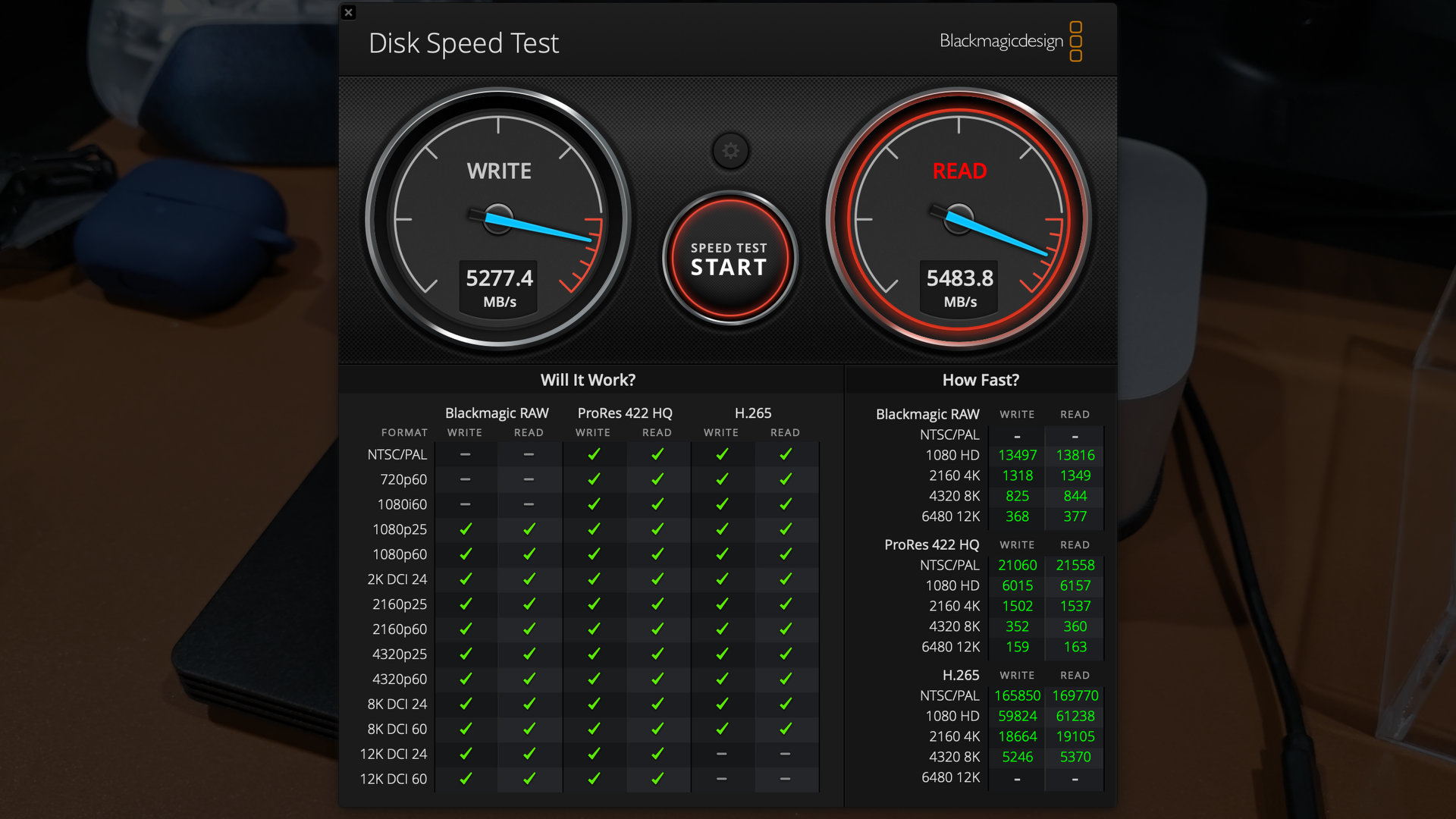
I also tried the famous Blackmagic Design Disk Speed Test and let it run for about 5 minutes non-stop, and the performance held up. We managed to get around 5.2GB/s write and 5.4GB/s read, and this OWC Envoy Ultra is basically fast enough to handle everything that we throw at it.
Temperature
As for the temperature, it’s actually much cooler than the Thunderbolt 4 SSD that I’m using now. While my current SSD burns my hand when I touch it, the OWC Envoy Ultra only hovers at around 40°C while running these synthetic benchmarks. That’s actually amazing.


From what I can deduce here, thermal throttling is quite difficult as it’s very well-integrated.
How I’m going to use the OWC Envoy Ultra?
Now, you might ask – why do I need such a fast SSD? Well, I edit videos. All the video files are stored in an external storage because the Apple tax to upgrade their computer’s SSD is insanely expensive. I use external SSDs because I can bring it wherever I go, and I can plug it into another computer in case my own Mac goes kaput.

That also means my external SSD needs to be superbly fast to keep up as I scrub through gigabytes of video footage in just a swipe of the mouse cursor. And even though our videos are only at 1080p 60fps, when we start to put more clips together on top of each other, that’ll stress the SSD’s read speed a lot. That’s why video editors should be looking to get one of this OWC Envoy Ultra.
Should you buy the OWC Envoy Ultra?
So, should you buy the OWC Envoy Ultra? Yes, if you need the fastest speed possible for your external SSD. Seriously, when you’re out on a shoot and every second matters, having a super speedy SSD like this where we can just dump all the footages somewhere, is a huge boon. It’s even better if we have two of them so we can have one for data redundancy.
And that’s where we have to talk about the price. The OWC Envoy Ultra is available in two variants, 2TB and 4TB, and the prices are as shown on the screen, alongside the price/gigabyte calculation. The calculation is based on the official pricing on OWC’s website, and we can see that the 4TB is obviously having a much better value, but it’s still very expensive at $600 USD.

I mean, it is nice that the Envoy Ultra has better value at higher capacity, but I do recommend buying it at whatever capacity that you need.
And that is all that we have to share with you today. The OWC Envoy Ultra is going to replace my Thunderbolt 4 SSD. I’ll probably also convert this Thunderbolt 4 SSD to redundant backup as I don’t have such a system setup for now and it’s also very dangerous. I guess I just like to live dangerously with these crucial work files.
Where to buy? (Affiliate links)